
Below are some instructions on how to register your team name and players.
In the main menu, click on Quick Links > Registration
Or here is a direct link to the registration page.
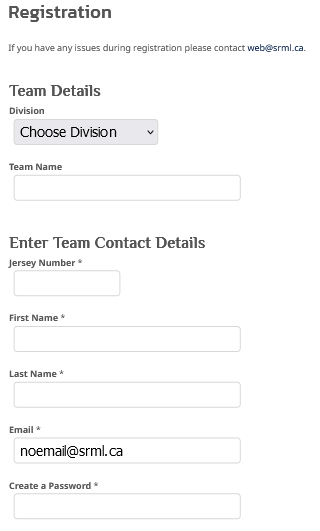
You'll see an entry form that looks like this (below).
On that page, enter your team name, choose your division and enter the captains personal details.
We require an email address for the captain and at least one other player, but email addresses are not required for all players on your roster.
You can just enter 'noemail@srml.ca' if you don't know a players email address.
Please also include the captains phone number as well.
Click the button at the bottom of the form that says 'Save and Continue'
On the next page, you'll see a confirmation that your registration was received (screenshot below).
Click on the blue 'Login' button (you can also login in the main menu under 'Quick Links', click 'Login').
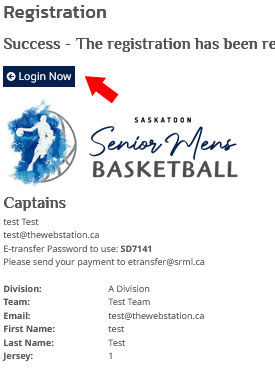
Login using the username and password that you just entered in the registration form on the previous page.
Now click on the green 'Add a Player' button.
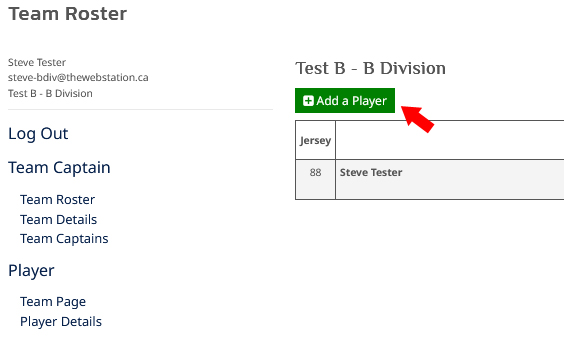
Add each player from your roster, one by one.
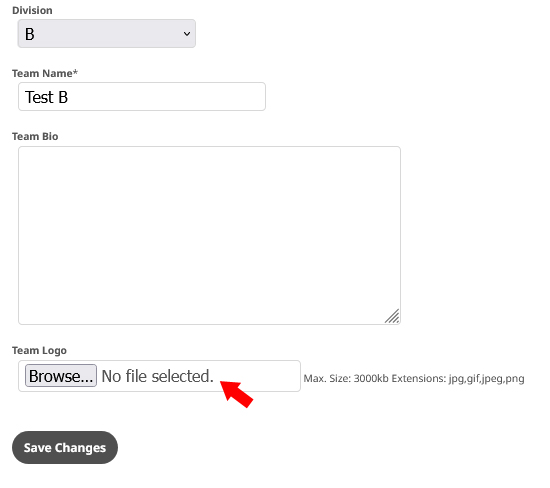
Add your team logo
In the Captains Menu on the left, click on 'Team Details'
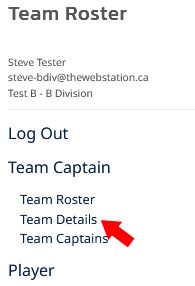
Use the 'Browse' button to select the image file from your computer.
Then click the 'Save Changes' button.
Send E-transfer to etransfer@srml.ca
The final step is to send your team fees in one or two different e-transfers to etransfer@srml.ca
* Please include your team name AND division in the memo of the e-transfer.
That's it, you're done!
* Note, your team won't show on the standings page or schedule page until your payment has been received and processed by the treasurer.
Thanks!
Any questions please feel free to contact me any time at web@srml.ca